Pages

Showing posts with label security. Show all posts

Sunday, October 30, 2016

Download Kaspersky Internet Security 2015 Gratis Software Antivirus


Download Kaspersky Internet Security 2015 Gratis, Software Antivirus
 Download Kaspersky Internet Security 2015 Gratis, Software Antivirus - Virus komputer banyak sekali macamnya dan sangat menyusahkan bagi para pemilik komputer bila virus tersebut ada di komputernya. Nah, karena ada virus tersebutlah maka dibuat software anti virus untuk komputer. Software anti virus juga banyak sekali ada Smadav, Kaspersky dan yang lainnyya. Nah, salah satu software anti virus yang hebat adalah Kaspersky. Software ini mampu menghilangkan berbgai jenis virus jahat yang ada di komputer kalian. Dan kali ini saya akan membagikan Kapersky versi terbaru yaitu Kaspersky Internet Security (KIS) 2015.

 Kaspersky Internet Security (KIS) 2015 merupakan software terbaru dari Kaspersky yang mampu menjaga komputer kalian dari serangan virus dan yang lainnya. Versi ini memliki fitur yang leih banyak dibandingkan versi sebelumnya. Salah satu fitur yang sangat menarik dari software ini adalah two-way firewall. Dengan fitur ini kalian bisa berinternet secara bebas tanpa takut di hack karena fitur tersebut mampu menghalangi akses yang tidak diinginkan secara 2 arah dan realtime. Sungguh sangat menarik bukan? Langsung saja download Kaspersky Internet Security (KIS) 2015. 

Download Kaspersky Internet Security (KIS) 2015
Read More..

Saturday, October 15, 2016

Anti Virus AVG Internet Security


AVG Internet Security akan memberikan perlindungan yang aman untuk anda ketika menjelajahi, menelusuri, mengunduh, bertransaksi perbankan, dan berbelanja online dengan aman. Dan melindungi komputer anda dari serangan-serangan seperti virus, spyware, adware dan trojan......

Dengan AVG Internet Security, Anda senantiasa mendapatkan pengalaman online secara aman. Dengan beberapa lapis perlindungan dari Internet Security, Anda tidak perlu cemas dengan pencurian identitas, spam, atau virus. Dan ini bahkan mencegah Anda secara tidak sengaja mengunjungi situs berbahaya.

Keamanan yang lebih cepat dan lebih cerdas ini tidak akan memperlambat komputer Anda

  • Bertransaksi perbankan dan berbelanja online dengan aman tanpa takut akan pencurian identitas berkat teknologi Perlindungan Identitas baru dari AVG
  • Menjelajahi dan menelusuri dengan rasa yakin, dengan LinkScanner® memeriksa halaman web di saat yang paling menentukan - tepat sebelum Anda mengklik tautan itu
  • Bertukar foto dan file lainnya dengan teman melalui IM dan jaringan sosial, aman dari risiko infeksi virus yang tak disengaja
  • Mengunduh musik dan aplikasi dengan aman
  • Menjaga kotak masuk Anda tetap bersih dari phisher, scammer, dan spammer sehingga Anda dapat fokus pada penggunaan email agar tetap terhubung dengan teman dan keluarga
  • Nikmati performa pemindaian berkecepatan tinggi yang konsisten dengan pemindai virus modern yang BARU dari kami
Yang ada di AVG Internet Security 9:
  • Anti-Virus & Anti-Spyware : Perlindungan terhadap virus, spyware, adware dan trojan
  • LinkScanner Search-Shield : Peringkat keselamatan waktu nyata untuk semua hasil penelusuran Google, Yahoo dan MSN/Live search
  • LinkScanner Active Surf-Shield : Melindungi dari laman web yang terinfeksi secara waktu-nyata saat Anda menjelajah web
  • Web Shield : Menyaring unduhan Anda dan mencegah infeksi tanpa sengaja melalui obrolan IM
  • Anti-Rootkit : Perlindungan terhadap ancaman tersembunyi yang mengantarkan konten jahat/merusak
  • Dukungan Gratis : Dukungan dan layanan gratis sepanjang waktu dan di seluruh dunia
  • Firewall : Menghentikan peretas (hacker) dan penyebaran virus di internet
  • Anti-Spam : Menangkap ancaman e-mail termasuk pencurian identitas (phishing), penipuan dan spam

PETUNJUK INSTALL :
  • Download file setup AVG Anti Virus
  • Lakukan Installasi
  • Ketika proses instal sedang berlangsung dan muncul menu “Activate Your AVG License” , masukkan data dan serial number/key nya.......
  • Lanjutkan Proses installasi sampai dengan selesai
  • Finished
Klik di bawah ini Untuk mendapatkan AVG Internet Security 9
Download AVG Internet Security 9

Untuk key / Serial Numbernya Silahkan klik di bawah ini
Download Key/Serial Number AVG 9

Key/Serial Number AVG Internet Security 9 valid sampai 26 Februari 2018 (9 tahun lebih).


AVG Internet Security 9.0 is compatible with : Windows 2000, Windows XP, Windows Vista, Windows 7
Read More..

Monday, July 11, 2016

norton internet security 2013


Note! Download Both Parts Then Extract Files And Install..

.. :: Part 1 :: ..
.. :: Part 2 :: ..

Password=www.fullypcgames.net

Read More..

Thursday, March 27, 2014

Software BitDefender Internet Security 2010 13 0 20

Read More..

Sunday, March 23, 2014

Hotspot Shield Protecting the web for your security privacy and anonymity

Hotspot Shield protects your entire web surfing session; securing your connection at both your home Internet network and Public Internet networks (both wired and wireless). Hotspot Shield protects your identity by ensuring that all web transactions (shopping, filling out forms, downloads) are secured through HTTPS.

Hotspot Shield also makes you private online making your identity invisible to third party websites and ISP’s. Unless you choose to sign into a certain site, you will be anonymous for your entire web session with Hotspot Shield. We love the web because of the freedom that it creates to explore, organize, and communicate. Hotspot Shield enables access to all information online, providing freedom to access all web content freely and securely. Secure your entire web session and ensure your privacy online; your passwords, credit card numbers, and all of your data is secured with Hotspot Shield. Standard antivirus software protects your computer, but not your web activities.

Hotspot Shield
Hotspot Shield creates a virtual private network (VPN) between your laptop or iPhone and our Internet gateway. This impenetrable tunnel prevents snoopers, hackers, ISP’s, from viewing your web browsing activities, instant messages, downloads, credit card information or anything else you send over the network. Hotspot Shield security application is free to download, employs the latest VPN technology, and is easy to install and use.

Hotspot Shield Key Features :
  • Secure your web session, data, online shopping, and personal information online with HTTPS encryption.
  • Protect yourself from identity theft online.
  • Hide your IP address for your privacy online.
  • Access all content privately without censorship; bypass firewalls.
  • Protect yourself from snoopers at Wi-Fi hotspots, hotels, airports, corporate offices.
Hotspot Shield runs on:
  • Windows 7
  • Windows XP
  • Windows 2000
  • Windows Vista
  • Mac OS X (10.4 Tiger)
  • Mac OS X (10.5 Leopard)
  • Mac OS X (10.6 Snow Leopard)
Download the latest version of hotspot shield here
Read More..

Sunday, March 16, 2014

Panda Internet Security 2011 Maximum Protection Against All Kinds of Threats

Panda Internet Security 2011 allows you to use the Internet for anything, like shopping and banking online, with total peace of mind and without any interruption. It protects you from viruses, hackers, online fraud, identity theft and all the other known and unknown threats.

In addition,  it keeps your inbox spam-free, and allows you to browse the web privately and securely with the entirely new Panda Safe Browser. With the Parental Control, your children can browse the Internet safely. Maximum protection against all kinds of Internet threats with Panda Internet Security 2011.

Panda Internet Security 2011

Panda Internet Security 2011 Key features:
  • Antivirus
  • Firewall and Identity Protect
  • Anti-Spam and Parental Control
  • Multimedia/Gaming Mode
  • Home Network Manager
  • Remote PC Access
  • Safe Browser (Sandboxing)
System requirements :
  • Windows 7 32 and 64 bits
  • Windows Vista 32 and 64 bits
  • Windows XP 32 bits
Download Panda Internet Security 2011 - Maximum Protection Against All Kinds of Threats from link below :
cnet
Read More..

Tuesday, March 11, 2014

AVG Internet Security 2014 v14 0 0 4016 Beta Full Version Free Download

AVG Internet Security 2014 v14.0.0.4016 Beta Full Version

AVG Internet Security 2014 v14.0.0.4016 Beta Full Version - is a program for protecting your PC from dangerous objects and network threats. Program blocks viruses, trojans, worms, spyware, and firewall to protect against network attacks. If you are using AVG Internet Security Business Edition 2014 you will not have to worry about identity theft, spam or viruses.

Installation Instructions:
Install AVG Internet Security 2014
Use the given keygen to activate
Done, Enjoy.

Download Here

Read More..

Thursday, March 6, 2014

How to get AVAST INTERNET SECURITY 8 for FREE upto 2050!!!


In this post, we are going to learn How to get AVAST INTERNET SECURITY 8 for FREE upto 2050!!!
It is not a crack/patch work completely. Instead it follows a clean method by patching some portion of the original AVAST INTERNET SECURITY 8.

Why AVAST INTERNET SECURITY 8 ?
According to cnet downloads, AVAST INTERNET SECURITY 8 is currently ranked #1 in Internet Security Software Suites. It makes it one of the most formidable and powerful antivirus software. Plus it runs both on the basis of virus-definition & online user statistics i.e Once a new virus is found somewhere in the world by an AVAST ANTIVIRUS, it sends it to the command center HQ and the information about that virus is immediately assimilated to all AVASTs all over the world. So it has a virtual immunity system of sorts!

Overall Protection: Avast Internet Security 8 is a complete antivirus solution
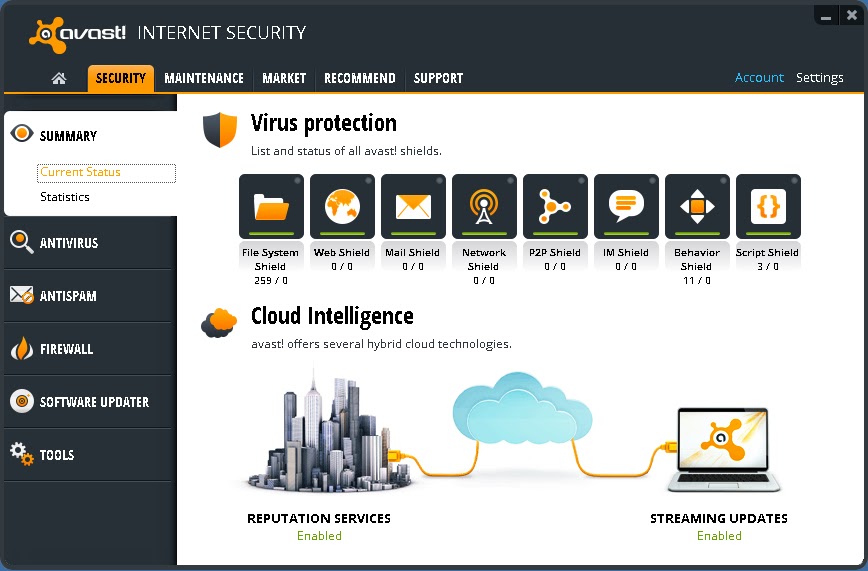


User-Friendly : AVAST has a smartphone like interface as its console.
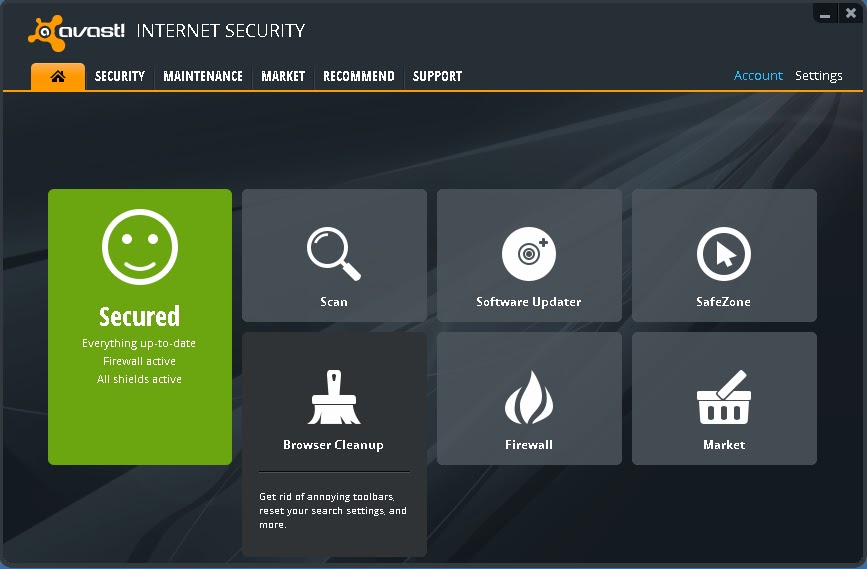


More than just an antivirus: It has many facilities like Software Updater, Browser Cleanup & Add-on management, Browser restore ; So that you dont have to rely on insecure 3rd party applications!


Okay! This is the part you have been waiting for......

HOW TO GET AVAST INTERNET SECURITY 8 FOR FREE!!

I will skip the explaining on how it works and basically tell you the process step by step.
[If you want details comment below] . Okay Here Goes,....
.
Step 1. First Download all the files that will be listed below and we can start off.
.
Download List:
>>Download Setup<< (Secure: Google Drive Internal Link)
>>Download original License file until 26/09/2013<< (Secure: Google Drive Internal Link)
>>Download License Faker until 2050<< (Secure: Google Drive Internal Link)
[A Secure high speed Dropbox link is being Uploaded or these files.  Links will be here soon]

If the above download Links dont work for you. Please try these alternatives:
>>Download Setup<< (External Link)
>>Download license file until 26/09/2013<< (Mediafire Internal Link)
>>Download license faker until 2050<< (Mediafire Internal Link)
.
Step 2. Unplug the Internet Cable or Disconnect from the Internet. You should stay offline for this. Remove your previous copy of AVAST if you have any!
.
Step 3. Install the given setup of AVAST INTERNET SECURITY 8 in "Trial Mode" (DO NOT USE LICENSE YET!! otherwise avast! will detect two licenses and your IP will be closely monitored.) Now "Restart" the computer.
.
Step 4. After restarting, open the Avast Console by double clicking the Avast icon on your desktop. On the top right option click on "Settings". Go to "Troubleshooting" on the left pane displayed in a new dialog box.
.
Step 5. Deselect or Unmark "Enable avast! self-defense  module". Click on "OK". Then open the Avast folder at C:Program FilesAVAST SoftwareAvast (your root drive may be different) and paste the file "ZeNiX.dll" after you rename it into "Version.dll". Keep "Version.dll" inside C:Program FilesAVAST SoftwareAvastSetup . Delete any "Userenv.dll" if you find any on those two folders.

Step 6.  Now run the registry file named "AVAST XP ZeNiX.reg". After the registry has been successfully added, run the program "Avast License ZeNiX 2012-06-29.exe". It is password protected. Password is "ZeNiX".
.
Step 6. Now open Avast Console again by double clicking icon at desktop. From the options given in the tab at the top, select "Maintenance". Then click on "Subscription" on the left pane selection. You will see a "10day" trial subscription. Now below that click "Insert Licence file". Now insert licence file "License.avastlic" and apply. Then you will get 13437days of amazing subscription!!
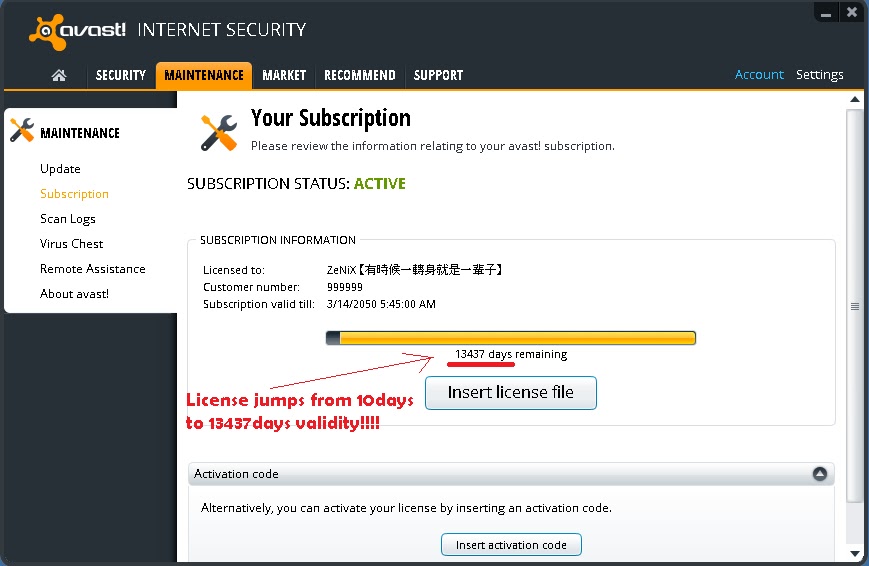


Step 7. Enable "avast! Self-Protection Module" and then restart. Now reconnect the internet connection. Be protected by software worth $49.5 for absolutely FREE!!
.
**Note : AVAST cost $49.5 (or nearly as much) for a SINGLE computer. This method can be used for multiple computers also which could cost hundreds of dollars!
.
Enjoy! and comment for review and feedback!


COMMENTS:

Read More..