Pages

Showing posts with label to. Show all posts

Wednesday, August 24, 2016

Anti Virus Karpersky to Mobile Phone

Bagi pengguna Mobile phone yang menggunakan sistem operasi Symbian (9.1 keatas) atau Windows Mobile (5.0 keatas), selama piala dunia 2010 ini berlangsung, bisa mendapatkan gratis Kaspersky Mobile Security 9 dengan kode serialnya. Tidak hanya mengamankan dari serangan virus/jaringan, tetapi juga proteksi privasi, menjaga akses file, dan berbagai fitur keamanan lainnya.

Sebagai software atau aplikasi keamanan untuk mobile phone (smart phone), Kaspersky Mobile Security 9 mempunyai fitur-fitur antara lain :
  • Privacy Protection, untuk mengontrol privasi nomor atau contact yang ada di mobile phone. Menampilkan atau menyembunyikan entri phonebook, sms dan daftar panggilan (logs)
  • Menemukan lokasi smartphone ketika dicuri/hilang, dengan menggunakan fitur GPS Find and function, smartphone yang dicuri bisa diketahui lokasinya.
  • Mengamankan contact, foto dan file dari akses yang tidak di inginkan. Data bisa di enkripsi dan di blok atau dihapus ketika smartphone hilang/dicuri
  • Blok SMS atau panggilan yang tidak di inginkan
  • Parental Control, orang tua dapat mencegah/blok sms atau panggilan tertentu dan juga melacak keberadaannya dengan GPS Find
  • Proteksi dari malware (virus) dan serangan jaringan
Fitur-fitur diatas memang menarik, salah satunya ketika mobile phone di curi orang, maka hanya dengan mengirimkan sms tertentu, mobile phone kita akan otomatis terkunci dan isiya tidak akan dapat diakses, bahkan bisa otoamtis memerintahkan untuk menghapus data-datanya. Termasuk fitur GPS Find yang bisa menampilkan posisi dimana mobile phone tersebut.

Fitur lainnya adalah SIM watch, yaitu misalnya ketika pencuri mengganti SIM card mobile phone, maka SIM Watch akan otomatis mem-blok HP dan mengirinkan email ke pemiliknya nomor baru yang dimasukkan.

Tetapi sekali lagi bahwa Kaspersky Mobile Security 9 memang tidak bisa dijalankan di semua HP, hanya mobile phone (smartphone) yang menggunakan Sistem operasi Symbian 9.1, 9.2, 9.3, 9.4 Series 60 (Nokia smartphones) atau Microsoft Windows Mobile 5.0, 6.0, 6.1, 6.5. Jika ingin mengeceknya, silahkan melihat Mobile Downloads

Download dan Installasi
Jika sistem operasi mobile phone anda mendukung software ini, untuk melakukan intallasi bisa menggunakan salah satu cara berikut :
  • Scan QR Code berikut menggunakan mobile phone untuk download Kaspersky Mobile Security 9
  • Buka alamat website kms.kaspersky.com melalui smartphone
  • Download aplikasi melalui PC/komputer melalui link http://www.kaspersky.com/mobile_downloads

Setelah aplikasi di download dan di install, gunakan kode registrasi ini untuk mengaktifkan BFK48-UJ3TR-AFKN3-RP5PU ( Kaspersky world cup )
Read More..

Sunday, June 12, 2016

How To Download And Install Hl Booster In Counter Strike


Download  here The hl booster.rar , unzipp the file (directly in addons or copy the booster folder in HLDScstrikeaddons, (HLDS is the directory where you have the server), then edit in HLDScstrikeaddonsmetamodplugins.ini,the
line:win32 addonshlboosterdlls ooster_mm.dll. Very important!!!! In order to work, in the HLDScstrikeserver.cfg you have to write the next line:

exec addons/hlbooster/hlbooster.cfg


Please UnCheck The Tick/Mark

Read More..

Saturday, June 11, 2016

Who wants to be a millionaire


Jar game enough to increase public knowledge, this is a jar game who wants to be a millionaire. Jar game arcade with a variety of questions that should be in charge if you want to win the game, java download 176x220   free dam will probably give you a general knowledge.

Filetype: Who wants to be a millionaire. zip
Filesize: 95.5 kb
Requirment: j2me or midp2, java, jar

Download here:

176x220
Read More..

Thursday, June 2, 2016

Simple Ways To Get High Traffic

There are some simple ways to get high traffic.
First Create unique titles. Optimization makes the head that contain the keyword in the search engines. And above all, make the game interesting as possible, invite the curiosity of potential readers. For example, to be number one on Google forever.
Second With the meta tag ’description’. Using the meta description tag searches Google or other search engines a summary of an article. Use a unique description for each item.
Third Use the URL structure is not practical. URL structure is easily searchable by the Google search engine is the name of the URL as short as possible (practice). Besides the short URL will be easy to remember (easier) for people who want to link to your blog.
4th Promote your blog. Promote your new blog is slowly and steadily. Promoting a blog effectively stimulate the discovery of your blog faster for those who have the same content of the blog. Such as the promotion of new products in the classified ad sites, without a list.
5th Optimizing the use of images (photos). The pictures of the blog is part of the blog, because the existence of an image will look on the blog every article of living. They are also doing well, plus advice and tips for SEO blogs and websites such as the use of a URL or a search engine friendly permalinks, use the right keywords, re-use, hiking blog, and so on. So .. the nucleus of a real quick way is to bring visitors to your blog or website to speed, to promote and optimize with your blog, so that visitors quickly.

fastcomputertools.com
Read More..

Monday, April 25, 2016

Download Pc Game Drive To Hell FULL VERSION


Description: 

Drive to Hell is an action-packed shooter where youll take a ride through an army of monsters to exact revenge on the Demon King for destroying your favorite dive bar. Enemies assault from all sides, each with its own special personality and attack style. To take them down, youll have access to many weapons and items as well as gunner upgrades, new vehicles, and more! Drive to Hell can be played solo or co-op with up to 4 players. 

SOURCE: Wikipedia.org 

Minimum System Requirements 

Operating system: Windows XP / Windows Vista / Windows 7 / Windows 8 
Processor: Pentium IV 2 ghz
Memory: 1GB 
Sound device: compatible with DirectX 
Hard disk space: 1 GB 


Download Link (43 Mb) 
Download Drive To Hell (FULL VERSION) 
Read More..

Sunday, April 6, 2014

Download Hanso Recorder 1 7 0 A tool for sound recording and text to speech reading

Hanso Recorder 1.7.0 : Converting Text-to-Speech and Recording Audio


Hanso Recorder is a feature-rich audio program developed for a wide range of sound tasks such as: converting CDs, tapes, DVDs, live performances, TV sounds, Internet radio, video games and any other sound source into audio files you can easily save on your computer. The software’s capabilities also integrate text-to-speech conversion that uses natural voices allowing you to listen to your documents while not around your computer. Hanso Recorder comes with support for the most popular formats including MP3, WMA, OGG, VOX, AU, AIFF.


This is a highly competent tool that can be used by anyone who wants to save their recordings or save their documents as audio files they can access from a multitude of audio playing devices.

After configuring the settings - the sound source, the recording quality, and volume, you can hit the record button. Just select the format you need and click Record CD. Required file format conversions are performed automatically with the use of smart caching to prevent duplicate conversions


Nice sound recorder. Simple and easy to use. 

Freeware
OS : Windows XP/Vista/7 
Size : 3.88MB
Download : Mediafire
Read More..

Friday, April 4, 2014

Google Page Speed to check the performance of your wesbsite

Google Page Speed is a popular tool from Google that analyzes website performance, and gives improvement suggestions. 


You can improve your website performance and make it faster.


 ---" How To Use It "--- 

1 - Just enter the URL of the website or web page for which you analyze performance, and click on “Analyze Performance” button.


2 - The results first shows an overall page score out of 100. This blog got a score of 85. Nice :) 


It will show improvement suggestions. The improvement suggestions are divided into high priority, medium priority, and low priority. You should start by implementing the suggestions under High priority list, as that will give most performance improvement. After that, you can move over to medium priority, and low priority.


Google Page Speed is really helpful, and handy. Check it out :)


Try It Now ( Its free )
Read More..

Friday, March 28, 2014

Lexitron Thai to English English to Thai Dictionary

Web-based Thai – English and English Thai dictionary developed by NECTEC (National Electronics and Computer Technology Center of Thailand). Lexitron also provides sample sentences.

Download Link:

http://rapidshare.com/files/53771255/LexiTron2.0.rar
Read More..

Monday, March 24, 2014

How to Reset Canon IP2770 Error 5200

How to Reset Canon IP2770 Error 5200. IP 2770 is a new printer, and I also at the first time get error 5200 on canon iP2770. Want to know how ...?

Early Indication:
When the iP2770 is turned on, the printer looks normal with GREEN LED on. But when ordered to print, then the 5200 on iP2770 error will appear, and the LED will blinking 8x green 1x orange.

How to Reset Canon IP2770 Error 5200

How To Reset Canon IP2770 Error 5200 :
  • The printer is off and plugged the power cord.
  • Press the RESUME button two seconds, then press the POWER button until the green light flame ( while pressing the POWER button, dont released RESUME button ) then release the Resume button, but do not release the POWER button.
  • POWER button while still pressed, press the Resume button 5 times. Led will flash alternately orange glow green with the last orange. (not to mistaken 4x because the printer will be totally dead, but it is temporary as well) Then ... 
  • Release both buttons simultaneously. Led will blink briefly and then will glow GREEN. And the computer will detect new hardware, just ignore ... 
  • Press the POWER button, then the printer will off. Press the POWER button again then the printer will on and ... 
  • PRINTER iP2770 is ready to use. 
Other way on How To Reset Canon iP2770 error 5200 : 
Turn the printer, and printer will look normal. Run the printer for printing a document or a print test, then the 5200 error will appear. Directly unplug the power cord without pressing on/off button Open it and slide it into the middle of its cartridges manually Unplug all cartridges and leave the lid open Turn on the printer, head carriage will move left and right because the lid is still open and will stop in the middle. Replace the cartridge, and close the right The printer will return to normal. servicetool_v1074_ip2770.rar

 this reset methode taken from Service Printer
Download Servicetool_v1074 for Canon iP2770
link
Read More..

Sunday, March 23, 2014

Convert your Partition from FAT32 to NTFS with CMD without Formatting or losing data

Convert Your Partitions from FAT32 to NTFS Without Formatting or Losing your data through Command Prompt - No Need for any Software..

Dear Readers, today i will lead you to how to convert Partition of any drive attached to a Windows PC either its a Hard Disk Drive, Flash Drive or an External HDD from FAT32 to NTFS... Lets Start with the Basics...

What is a File System ?
A: A file system is the underlying structure a computer uses to organize data on a hard disk. If you are installing a new hard disk, you need to partition and format it using a file system before you can begin storing data or programs. In Windows, the three file system options you have to choose from are NTFS, FAT32, and the older and rarely-used FAT (also known as FAT16).

Advantages of NTFS over FAT32
  • The capability to recover from some disk-related errors automatically, which FAT32 cannot.
  • Improved support for larger hard disks.
  • Better security because you can use permissions and encryption to restrict access to specific files to approved users.
  • Maximum Volume Size is 2TB over 32GB of FAT32
  • Maximum File Size for Storing is nearly Unlimited over 4GB of FAT32
  • Allows Compression of Files and Folders where as FAT32 doesnt
  • Has the ability to auto counter disk related problem that are not major, while FAT32 always performs Chkdsk command at startup when an error is encountered.

Many a times you might have thought of converting your Partitions from FAT32 to NTFS because of the excessive features offered by the NTFS Partition and Suddenly a question arises that this might result in Loss of Data of your Partition.
So, Heres how to get it done through Command Prompt..

Converting Your Partition File System From FAT32 to NTFS 
  • Open Command Prompt in Administrator Mode, To do this, click on start (Win XP/Vista/7) or Hit Windows button (Win 7/8) --> under the search bar, type in Command --> When you see a black icon labeled Command Prompt, Right click on it and select Run as Administrator.
  • After the command prompt windows has appeared, enter the following command" convert C: /FS:NTFS " - without double quotes.(Replace letter C: with any drive you want to convert)
  • You will be asked to confirm the Volume label of the Partition you want to convert.
  • Thats it.. it will take some time depending on your system, running tasks and storage allocated to that partition.
  • Take Sometime and perform " Chkdsk  C: /F " command before converting your partition to any other filesystem. This ensures that you have a healthy partition and no errors occurs during conversion process.


Tags: convert partition without formatting, convert partition without losing data, fat32 to ntfs without software, convert ntf to fat32 with command prompt, command, cmd, dos


Read More..

Saturday, March 22, 2014

How to download Facebook Videos

How to download Facebook Videos
In This Tutorial I Will Explain You How to Download the Facebook Videos from your friends profile easily.

Step 1:- First Of all open http://m.facebook.com on your PC browser. (Google Chrome recommended)
Step 2:-Then Login to Your Account.
Step 3:- After Logging in to your account go The Video page (Fig-1)
How to download Facebook Videos
Fig-1
Step 4:- Click on the External Link and a new window Will Open. (Fig-2)
How to download Facebook Videos
Fig-2
Step 5:- Copy The URL of The Window.

How to download Facebook Videos

Step 6:- Now Paste this in the Internet Download Manager, add URL Window.

How to download Facebook Videos

Step 7:- Click OK and You are done the video from your friends profile will be downloaded without any streaming.
Read More..

PDF Unlocker Software Unlock PDF Restrictions Enable PDF Rights to Unlock PDF File

Do you have a PDF file which restricts copying and printing contents from it? This may be due to restrictions imposed by the owner of the PDF files using PDF creator software. Now remove PDF restriction from PDF File in just one click with most trusted and widely used SysTools PDF Unlocker tool. PDF Unlocker tool enable PDF rights for copying, editing, printing and extracting with PDF Unlocker program as it unlock PDF restrictions.

PDF Unlocker tool is powered with batch mode to help users to perform bulk PDF unlocking. PDF Unlocker is a PDF restriction remover to unlock protected PDF files but you should know its password for opening the PDF document if it is protected with User Password. Software successfully unlock PDF restrictions from the PDF document if it is not protected with User Password, is only restricted with Owner Password for copying text, modifying the document, printing and extracting.

PDF Unlocker software removes PDF restriction from PDF file created with Acrobat version up to 9, even with 128-bit or 256-bit encryption. PDF Restriction Removal Tool successfully runs on Windows 98/ME/2000/2003/XP/Vista. DEMO version of SysTools PDF Unlocker is available for FREE download. Demo version of the software remove PDF restrictions from sample PDF file provided with the software setup.

PDF Unlocker Software - Unlock PDF Restrictions & Enable PDF Rights to Unlock PDF File

PDF Unlocker Software Key Features :
  • Remove PDF Restriction - PDF Unlocker is a PDF Restriction Removal tool that can remove PDF restrictions for copying, editing, printing and extracting.
  • Remove Restriction from Protected PDF File - Remove protected Adobe Acrobat PDF files, removing restrictions on printing, editing, copying (you should have the right to do it or you should know the User Password.).
  • Support all version of Adobe Acrobat - SysTools PDF Unlocker successfully Acrobat version up to 9, even with 128-bit or 256-bit encryption.
  • Software runs on all Windows version - SysTools PDF Unlocker software successfully supports and runs on Windows 98/ME/2000/2003/XP/Vista.
  • Download PDF Unlocker Software - Try and get File Restore software to unlock restricted PDF files
Read More..

Wednesday, March 19, 2014

ConvertXtoDVD Convert video to DVD and watch on Any DVD Player

Create DVDs from various video formats to watch them on TV with any DVD player. ConvertXtoDVD has been designed so you do not need to think about anything. Add 1 or more video files, insert a blank DVD and your videos will be converted and burnt automatically on to DVD with chapters and an elegant DVD menu. No external codecs needed. See the supported formats tab.

ConvertXtoDVD, our avi to dvd converter software, has included a conversion advisor tool that will automatically apply the best quality settings based on the videos you have added to your project.

ConvertXtoDVD - Convert video to DVD  and watch on Any DVD Player

ConvertXtoDVD Features :
  • Create menus with videos and music
  • Preview window
  • Add chapters - automatic or custom
  • Subtitle files supported
  • Convert NTSC to PAL and vice-versa
  • Merge function - like for CD1 + CD2
Download ConvertXtoDVD - Convert video to DVD  and watch on Any DVD Player
Read More..

Saturday, March 15, 2014

AimOne Audio Video to MP3 or WAV Converter v1 82

With AimOne Audio/Video to MP3/WAV Conveter, you can easily extract and convert audio from almost any kind of Audio and Video file types to MP3/WAV output in batch mode. It offers a built-in-player to view or listen to the file before extracting the sound, which allows you to set the start/end points of the portion you want to extract and convert. Supports AVI, VCD, DVD, MPEG, WMV, WMA, DAT, AC3, RM and other formats.

AimOne Audio Video to MP3 or WAV Converter v1.82

AimOne Audio/Video to MP3/WAV Conveter Features:
  • Convert AVI to MP3, AVI to WAV, Support DivX, XviD
  • Convert MPEG to MP3, DVD to MP3, VCD to MP3, Support MPEG-1, MPEG-2
  • Convert ASF to MP3, WMV to MP3, WMA to MP3
  • Convert RM to MP3, RA to MP3
  • Support WAV to MP3 and MP3 to WAV
  • Support DivX, XviD AVI, DVD, VCD, RM, RA, WAV, MP3 format
  • Video preview
  • Support Audio/Video Selection, so you can extract any sound segment save as mp3
  • High audio quality
  • Support batch function
System Requirements:
  • Microsoft DirectX 8.1 or later runtime
  • Microsoft Windows 98/ME/2000/XP/2003/Vista/Win7
Download AimOne Audio Video to MP3 or WAV Converter v1.82 from link below :
web developer
Read More..

Thursday, March 13, 2014

How to Fix Damaged Flashdisk

Source | togeltoto12.wordpress.com

You must be really upset if flasdisk yes you broken anything else in the flash you are some records or documents or files is very important for you and you could not take your pendrive is damaged but well here I would like to share your experiences about repairing a damaged flash , you want to know how where do I see the following.


1. lightweight:
First go to Run, type cmd, and then type chkdsk Drive Letter: / f
information
a. DOS chkdsk command is a command error checking on the disk
b. Letter Drive: Drive is the location of flash, this command places the contents of the flash drive.
c: / F was Fixes errors on the disk, the command to remove errors on the disk.

Wait until the process is running 100%, If a command Convert folder to file? [Type] Y. then delete the file / folder was corrupted with the command DEL V: *. *.


2. Rather heavy:
a. Download the application Hewlet Packard USB Disk Storage Format Tool
b. Install the application, and enter the flash are problematic to any USB port. Make sure your flash is detected
c. Run the application HP USB Disk Storage Format Tool
d. Determine where the flash drive is plugged in,
e. Select Create New or Replace Existing Configuration to create a new partition and erase the existing configuration on the flash,
f. Format your flash file system in accordance with the desired.

3. Weight:
If the stick were damaged by bad sectors, the next step could be the last alternative use Partition Magic utility. This tutorial uses Partition Magic 7.0.
With this software, we try to cut his Bad Sector by:

a. Install Partitioan Magic 7.0
b. Setelah proses instalasi selesai, jalankan programnya. Tekan menu Resize Partitions. Lalu arahkan ke drive tempat Flashdisk kita berada. Menu ini akan merubah ukuran partisi flashdisk kita. Lalu tentukan ukurannya dengan tidak menyertakan lokasi Bad sector.


To note that PartitionMagic able to check for bad sectors via the menu Operations -> Check for Errors as a feature in Windows. ScanDisk
This utility needs to be done before running Partition Magic to ascertain the location of bad sectors.

Well hopefully this way you can flash back to normal.

Read More..

Friday, March 7, 2014

How to fix MSVCR100 DLL is Missing


This msvcr100.dll is the Microsoft Visual C++ Redistributable dll that is needed for projects built with Visual Studio 2010. The dll letters spell this out. 

MS = Microsoft
V = Visual
C = C++
R = Redistributable


When starting some applications or games like angry birds and fruit ninja for PC this error may occur. But don’t worry. Here is an easy solution to fix MSVCR100.dll missing error. Download and Install the files below depending on your operating system version and you can start your application or games.


Microsoft Visual C++ 2010 Redistributable Package (x86)
Read More..

Thursday, March 6, 2014

How to get AVAST INTERNET SECURITY 8 for FREE upto 2050!!!


In this post, we are going to learn How to get AVAST INTERNET SECURITY 8 for FREE upto 2050!!!
It is not a crack/patch work completely. Instead it follows a clean method by patching some portion of the original AVAST INTERNET SECURITY 8.

Why AVAST INTERNET SECURITY 8 ?
According to cnet downloads, AVAST INTERNET SECURITY 8 is currently ranked #1 in Internet Security Software Suites. It makes it one of the most formidable and powerful antivirus software. Plus it runs both on the basis of virus-definition & online user statistics i.e Once a new virus is found somewhere in the world by an AVAST ANTIVIRUS, it sends it to the command center HQ and the information about that virus is immediately assimilated to all AVASTs all over the world. So it has a virtual immunity system of sorts!

Overall Protection: Avast Internet Security 8 is a complete antivirus solution
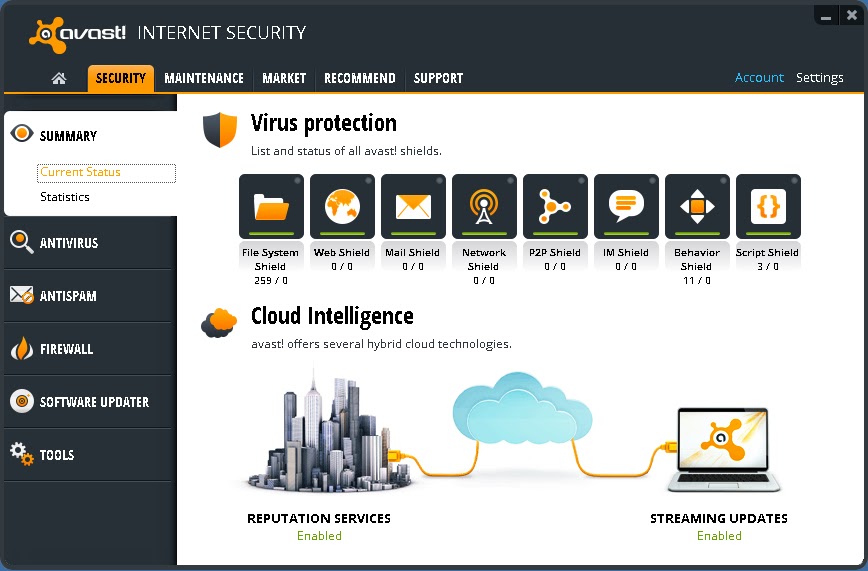


User-Friendly : AVAST has a smartphone like interface as its console.
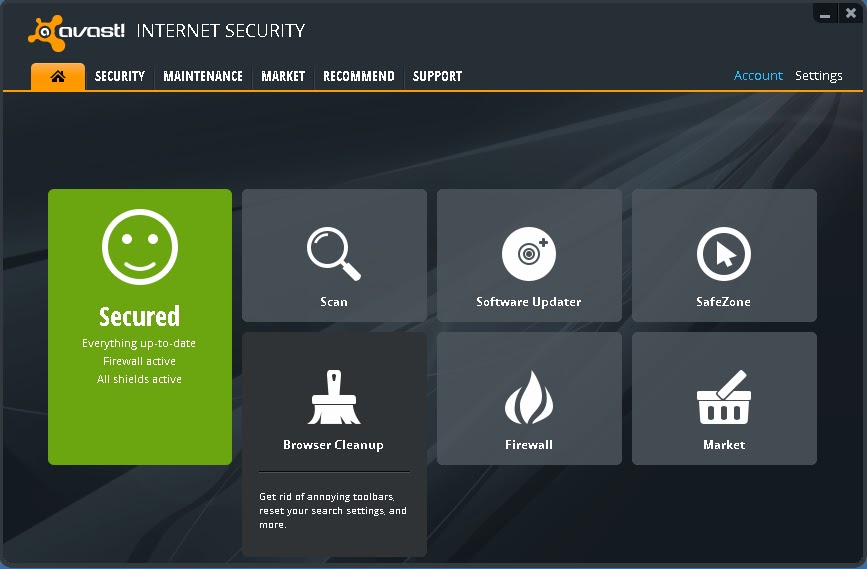


More than just an antivirus: It has many facilities like Software Updater, Browser Cleanup & Add-on management, Browser restore ; So that you dont have to rely on insecure 3rd party applications!


Okay! This is the part you have been waiting for......

HOW TO GET AVAST INTERNET SECURITY 8 FOR FREE!!

I will skip the explaining on how it works and basically tell you the process step by step.
[If you want details comment below] . Okay Here Goes,....
.
Step 1. First Download all the files that will be listed below and we can start off.
.
Download List:
>>Download Setup<< (Secure: Google Drive Internal Link)
>>Download original License file until 26/09/2013<< (Secure: Google Drive Internal Link)
>>Download License Faker until 2050<< (Secure: Google Drive Internal Link)
[A Secure high speed Dropbox link is being Uploaded or these files.  Links will be here soon]

If the above download Links dont work for you. Please try these alternatives:
>>Download Setup<< (External Link)
>>Download license file until 26/09/2013<< (Mediafire Internal Link)
>>Download license faker until 2050<< (Mediafire Internal Link)
.
Step 2. Unplug the Internet Cable or Disconnect from the Internet. You should stay offline for this. Remove your previous copy of AVAST if you have any!
.
Step 3. Install the given setup of AVAST INTERNET SECURITY 8 in "Trial Mode" (DO NOT USE LICENSE YET!! otherwise avast! will detect two licenses and your IP will be closely monitored.) Now "Restart" the computer.
.
Step 4. After restarting, open the Avast Console by double clicking the Avast icon on your desktop. On the top right option click on "Settings". Go to "Troubleshooting" on the left pane displayed in a new dialog box.
.
Step 5. Deselect or Unmark "Enable avast! self-defense  module". Click on "OK". Then open the Avast folder at C:Program FilesAVAST SoftwareAvast (your root drive may be different) and paste the file "ZeNiX.dll" after you rename it into "Version.dll". Keep "Version.dll" inside C:Program FilesAVAST SoftwareAvastSetup . Delete any "Userenv.dll" if you find any on those two folders.

Step 6.  Now run the registry file named "AVAST XP ZeNiX.reg". After the registry has been successfully added, run the program "Avast License ZeNiX 2012-06-29.exe". It is password protected. Password is "ZeNiX".
.
Step 6. Now open Avast Console again by double clicking icon at desktop. From the options given in the tab at the top, select "Maintenance". Then click on "Subscription" on the left pane selection. You will see a "10day" trial subscription. Now below that click "Insert Licence file". Now insert licence file "License.avastlic" and apply. Then you will get 13437days of amazing subscription!!
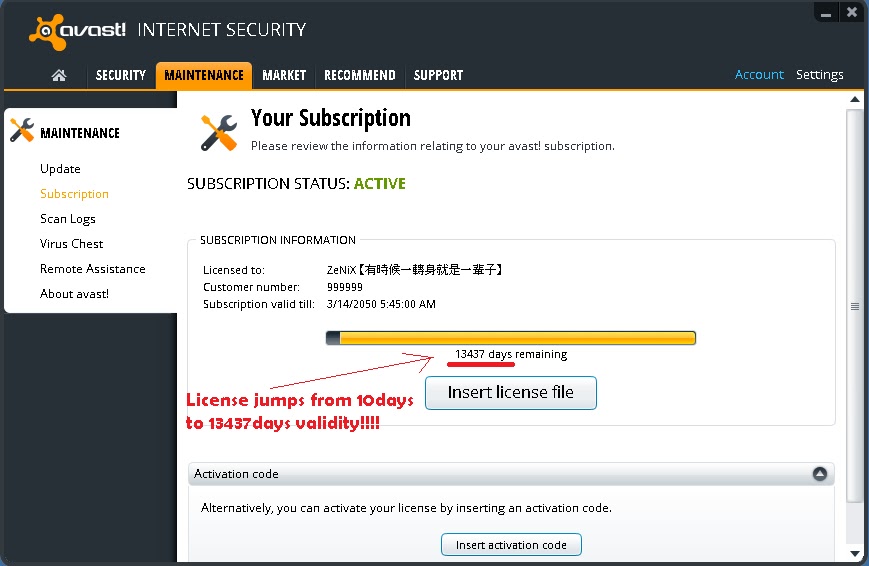


Step 7. Enable "avast! Self-Protection Module" and then restart. Now reconnect the internet connection. Be protected by software worth $49.5 for absolutely FREE!!
.
**Note : AVAST cost $49.5 (or nearly as much) for a SINGLE computer. This method can be used for multiple computers also which could cost hundreds of dollars!
.
Enjoy! and comment for review and feedback!


COMMENTS:

Read More..

Monday, March 3, 2014

How to use Asus USB MIR adaptor to other motherboard


One of my client recently try to use the ASUS USB/MIR REV. 1.11 (the 2 usb port type) adaptor which he got from his old ASUS motherboard to his new computer. His problem is any USB storage device he try to insert in ASUS USB/MIR port a "USB Device Not Recognized" pop-up appear.
The problem is, Asus have fitted filtering on the two data lines to each USB port in the form of a series resistor (10 ohms on one line and 4.7 ohms on the other) and a shunt capacitor to ground at the USB socket end which cause the problem.

The only solution is to remove this filtering by removing the four SMD capacitor (C2, C3, C4, C5). Do not remove C1, C6 and the electrolytics CE1 and CE2. I use hot air rework station to remove those SMD capacitors. After the removal the Asus USB/MIR device recognized any USB flash drive that I inserted.
Read More..

Saturday, March 1, 2014

How to Cleaning Clogged Canon Print Heads

undefinedCanon Printer CartridgeCanon printers have a removable printer head that holds the ink cartridges. It is important to print a few pages in both black and color at least once per week in order to keep the ink flowing and prevent clogging.

If the printer head nozzles are blocked or dried out you will need to dissolve the dried ink. An inkjet nozzle has a diameter of about 45 microns which is about 1/2 the width of a human hair. Normally you can clear up minor clogs and streaking by running the cleaning cycle found in your printers software utility.

However if the cleaning cycle doesnt do the trick in clearing up poor and incomplete output, dont give up and assume youll need to buy a new printer head (which can cost more than a new printer). Canon owners have reported multiple ways to resolve this problem at little or not cost - some of the most popular methods are described below.

Below Steps for Manually Cleaning the Printer Head

Step 1

  • Remove the ink tanks and printer head. Remove the ink tanks from the printer head tank holder) and seal them in a zip lock or other sealable plastic bag. Set them aside, preferably propped upright.
  • Next remove the printer head (it snaps out). NOTE : You may want to wear latex gloves to help keep ink off your hands.

Step 2
Soak the printer head. There are multiple suggestions on ways to clean the printer head and all have some variation on the following :
  • Get a small, shallow pan and lay down a layer or two of paper towels in the bottom of the container to protect the printer head circuitry from contact damage.
  • Heat up (via microwave) enough purified/bottled water to cover the paper towels. You can also use a 50/50 mixture of ammonia and distilled water (about a pint will do). Heat the mixture in the microwave for about a minute or so - it should NOT be boiling.
  • Slowly pour the water or mixture over the paper towels so that you have approximately 1/2 inch of liquid in the bottom of the pan.
  • Set the printer head into the container on top of the towels. You should see ink bleeding out. Move the print head to several different spots (about a minute each spot) and shake gently. This will dissolve the ink clogs.
  • If the printer head is badly clogged let it soak for 3 to 4 hours or overnight. You can move it slightly to a different spot every hour or so.

Alternative Soak Method :
Mix a 50/50 solution of warm water and Windex and place in a shallow container, enough to cover the base of the printer head and ink ports. Leave for 2 hours while agitating the unit occasionally. Remove from the mix and lightly scrub the base and internal ink ports with an old soft toothbrush. Do not scrub the gold contacts but dont be concerned if they get wet. Return the unit to the mix for another 2 hours and agitate occasionally. Remove and scrub again as before.

Step 3
Flush the printer head with water.
  • Hold the unit under a softly running warm water tap. Place your finger over the tap to create back pressure to allow you to squirt the water into all crevices of the printer head. You should see the gunk build up flow out. Do this until the water runs clear.

Step 4
Dry the printer head and replace.
  • Remove the printer head and rinse it thoroughly with distilled water. Shake it dry and set it on folded paper towels to air dry. (Some folks use a hair dryer on a low setting to dry the printer head.)
  • Reinsert the printer head and ink tanks. The printer should automatically do a "Printer Head Alignment." If it doesnt, manually perform "Printer Head Alignment" through the printers utility. Next run a printer head cleaning cycle or two followed by printing a nozzle check pattern to check your progress.
  • Repeat as necessary.

Variations on the Above Steps
  • Soak the printer head in one of the proprietary solutions (Cartridge Flush, Magic Inkjet Flush) specifically designed to clear print heads. Soak the print head for about 10 minutes to overnight depending on the degree of blockage. It has also been reported that you can clean the print head with an electronic toothbrush and cleaning solution for about 20 seconds with excellent results.
  • Use a full eye dropper to flush alcohol through the appropriate ink hole(s) that show inside the printer head unit. Dont rush this: do a drop at a time or you might flood the inside of the unit.
  • Purchase an ultrasonic cleaner. Wash the printer head under the water tap to remove excess ink. Load the cleaner with the printer head and water so that the printer head rests lengthways in the cleaner with the electrical contact surface visible. Repeat the cleaning program a few times, using clean water in each program.

Preventive Maintenance
  • Its a good idea to regularly conduct preventive maintenance on your inkjet printer to prevent it from developing clogged printer heads. Printer heads become blocked for a number of reasons, but the most common is simply that the ink cartridge and the printer head have dried out.
  • Never let the printer stand with an empty cartridge. Either fit a fresh one, or seal the print head unit in a plastic bag with a few drops of water for humidity. Since print heads become clogged when not used for long periods of time, regularly print a page or two to keep the print heads clear. Some experts say that it is better to print one colorful page a week than to run a printer cleaning cycle, because doing so uses a lot less ink. Ideally, printer cleaning cycles should be started once a week to prevent the printer head from getting clogged.

There are other more ink efficient ways to be able to clean printer heads that will prevent their clogging just as effectively as running the printers cleaning cycle :
  • Brush the printer heads with Q-tips soaked in water. Sources vary on whether alcohol would be more effective than water, but in the opinion of some printer experts alcohol can be harmful to printer heads and should thus be avoided.
  • Buy a cleaning kit and use it regularly on your printer. A typical cleaning kit usually has a tube of ammonia that you can spray on the printer head to remove dried ink.
  • Covering the printer when not in use to keep it free from dirt and debris also helps prevent the printer heads from getting clogged.
Read More..

Friday, February 28, 2014

How to Reset the Ink Level for Canon MX300

Canon MX300Solution to reset the ink level for Canon MX300. The methode get from printer forum
  1. Disconnect the power cable
  2. Connect it while holding down the power button
  3. With the power button still down, press twice the "Cancel/Stop" red button
  4. Release the power button
  5. The printes turns into a kind of factory mode...(wait for about 10 seconds, utils it says "Idle")
  6. Press the ">" (next to the "OK" button) once."Shipping Mode 3"
  7. Press the "OK" button.
  8. Press "OK" again for "Without cleaning"
  9. A test page will print..
  10. Open the cover, like you are about to change the cartridges.
  11. Disconnect the power cable again.
  12. Take out both cartridges.
  13. Close the cover.
  14. Connect the power cable once again.
  15. Turn the printer on.
  16. Now just put the cartridges back
Read More..